[now on iphone & ipad]
Studio
Field
Companion for Teenage Engineering instruments — connect over USB, keep libraries and backups safe, and take the same workflow on iPhone and iPad.
OP-1 field · OP–XY · EP–133 · OP-1 original · OP-Z
[tape deck]
Same reel animation as the Mac and iOS player
[listen]
Spin the reels
A real 4-track OP-1 field tape — hold rewind and fast-forward for audible shuttle, same transport as Mac, iPhone, and iPad.
DEMO TAPE....
[demo · groove]
Load the demo when you want to listen — the rest of the site stays light.
[demo tape · groove]
idle[tape speed]
[tracks]
- Track 1
- Track 2
- Track 3
- Track 4
Inside the apps
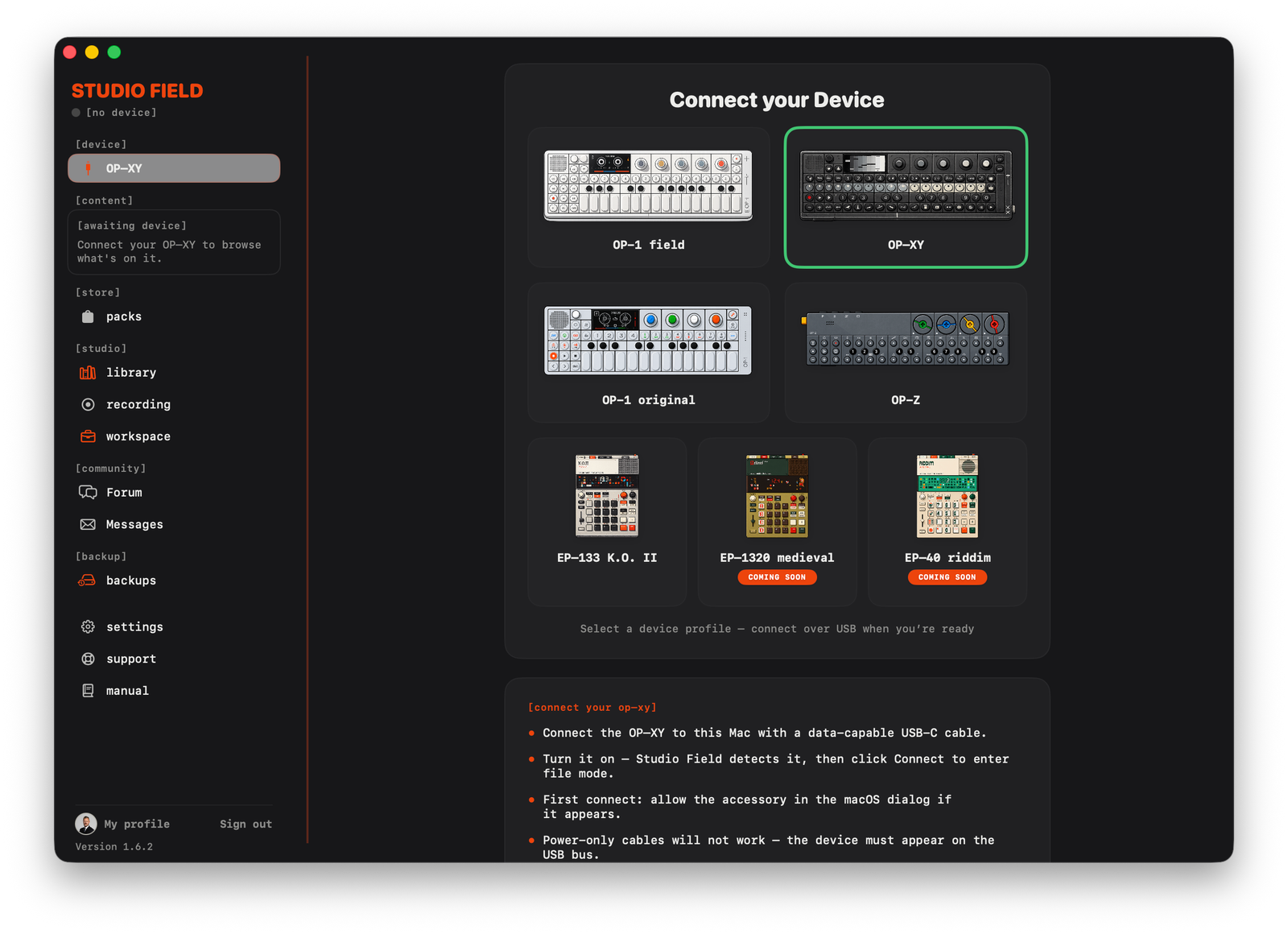
The Mac companion for every supported TE device — plus the new iPhone and iPad app that shares your Field library over iCloud.
[product shots]
[what it does]
Built for the instruments you actually use
Connect over USB, keep each device’s library and backups separate, and take the new iOS companion with you. Read-only until you confirm a write.
NEW
Now on iPhone & iPad
Studio Field for iOS is here — connect over USB-C, browse and preview tapes, back up the device in your pocket, and keep the same iCloud libraries as on Mac. No laptop required when you’re on the move. Mac is included with your purchase.
CONNECT
One profile per instrument
OP-1 field, OP–XY, EP–133 K.O. II, OP-1 original, and OP-Z. Plug in over USB and Studio Field switches to that device — file mode or mounted disk, live battery and storage when the instrument reports it.
SAFETY
Read-only until you confirm
Nothing is written to a connected device without your say-so. Libraries and backups stay namespaced per model — never mixed. Preview before anything goes back onto the hardware.
BROWSE
Four-track preview
Play OP-1 field and original tapes with mute, solo, and tape speed. Bounce to stereo in your library. Convert an original tape to Field format. Record stereo USB audio from OP–XY, then trim and fade.
LIBRARY
Mac, iPhone, iCloud
A dedicated library for each device. Optional private iCloud keeps Field tapes and mixdowns in sync with iPhone and iPad — download only what you need, nothing is removed from your Mac.
BACKUPS
Full-device snapshots
One-click backups and restore, with a separate history for every instrument. The same iCloud backup list on Mac and iOS. Reveal in Finder or export a copy when you want one.
[download]
Get Studio Field
Now on iPhone and iPad. One App Store purchase includes Mac and iOS. Android is on Google Play. Windows is on Microsoft Store.
[contact]
Questions or feedback?
Send a message with the form — we read every request and reply by email.